

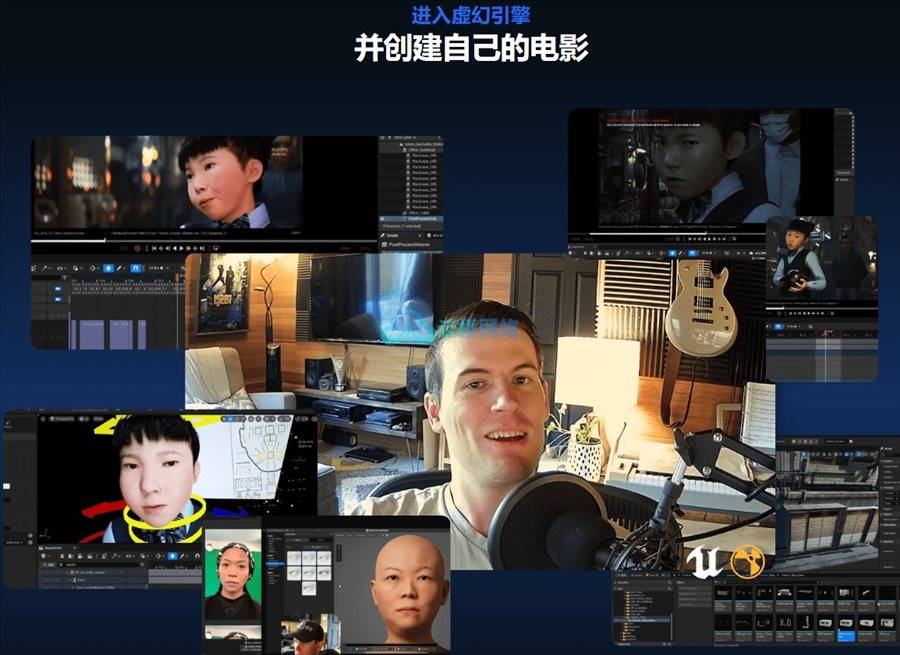
这是一场实战工作坊,旨在将你的故事从概念转化为最终渲染。由知名艺术家Calvin Romeyn亲授,课程浓缩了他耗时两年创作短片《Firmware》时积累的核心技能。
无论你是电影制作人、动画师还是游戏开发者,本课程将教你如何运用虚幻引擎的强大功能规划并实现电影级镜头。Romeyn曾担任工业光魔首席合成师,亦是Niche VFX联合创始人,每节课都将倾注其深厚的行业经验与影视叙事智慧。
激发灵感 · 掌握流程 · 用虚幻引擎创作你的个人短片
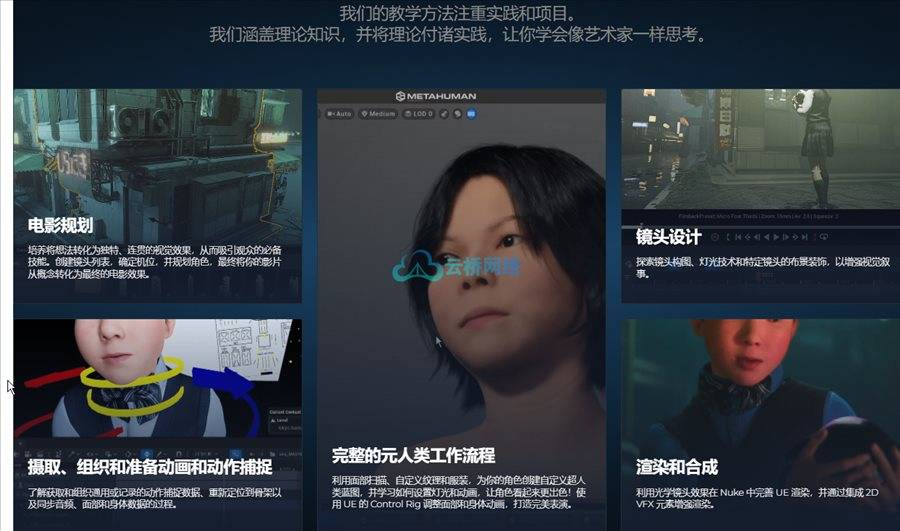
我们采用项目制实战教学:
既传授理论更注重实践,培养艺术家的思维方式
课程时长:7小时50分钟 1920X1080 mp4 语言:英语+中英文字幕含课程文件
第一周:项目构思与研发
学习重点:
· 参考素材选取、资产收集与管理、项目架构设计、工作流搭建
第二周:定制MetaHuman角色蓝图
学习重点:
· 服装设计、面部扫描与纹理优化
第三周:场景布局
学习重点:
· 基础环境中的虚拟勘景
· 搭建动捕舞台临时布景以实现场景可视化
第四周:动捕拍摄规划
学习重点:
· 分镜清单制定、机位布置、演员走位设计等
第五周:动捕数据预处理
学习重点:
· 动捕与性能捕捉数据的导入与分类管理
· 骨骼重定向
· 音频/面部/身体数据同步
· 运用MetaHuman Animator解析面部表演
第六周:剪辑与镜头编排
学习重点:
· 动画片段筛选、镜头设置、临时摄像机架设
· 使用UE Sequencer进行粗剪
第七周:虚拟摄影机
学习重点:
· 动画片段精选与镜头设定
· 通过Live Link将虚拟摄影机系统连接至IOS设备
· UE场景实时推流至IOS屏幕
· 摄影机镜头录制技巧、最佳实践与手动微调
· 最终剪辑定版
第八周:动画精修
学习重点:
· 运用UE Control Rig调整面部与肢体表演
· 导入ABC文件实现定制动画(布料、刚体动力学等)
第九周:镜头美学设计
学习重点:
· 画面构图与光影设计
· 场景装饰、道具散布、背景人群布置
· 按序列与单镜头进行针对性调整
第十周:MRQ渲染与Nuke合成
学习重点:
· 使用Cryptomattes进行调色合成,搭配2D特效增强UE效果
· 最终润色与光学特效处理
Cinematics In Unreal Engine。Step into the world of real-time filmmaking with Cinematics in Unreal Engine. A hands-on workshop designed to take your story from concept to final render. Taught by acclaimed artist Calvin Romeyn, this course distills the skills he developed over two years while creating his short film Firmware. Whether you’re a filmmaker, animator, or game creator, this workshop will teach you how to plan and execute cinematic shots using the full power of Unreal Engine. Romeyn, a former lead compositor at ILM and co-founder of Niche VFX, brings a wealth of industry knowledge and cinematic storytelling expertise to every lesson. Get inspired. Learn the pipeline. Create your own short film in Unreal. Our teaching approach is hands-on & project-based. We cover the theory and put it into practice so you can learn how to think like an artist. WEEK 1 Project Concept and R&D What we will cover: • Picking references, collecting and organizing assets, project schema, workflows。WEEK 2 Custom Meta Humans Blueprint What we will cover: • Costumes, face scan and texture improvements、WEEK 3 Environment Blocking What we will cover: • Virtual location scouting in a basic environment • Creating temp sets for visualising each location on the mocap stage。WEEK 4 Planning a Mocap Shoot What we will cover: • Shot list, camera placement, actor blocking, etc。WEEK 5 Prepping Mocap Data What we will cover: • Ingesting and organizing Mocap and Pcap data for editing • Retargeting to skeletons • Syncing audio, face, and body data • Using Metahuman Animator to solve facial performance。WEEK 6 Editing and Blocking What we will cover: • Choosing animation takes, setting up shots, temp cameras •Assembly edit using UE’s Sequencer。WEEK 7 Virtual Camera What we will cover: • Choosing animation takes, setting up shot • Setting up virtual camera rig to IOS device using Live Link • Streaming UE environment to IOS screen • Recording camera takes, best practices, and manual adjustments• Finalising edit。WEEK 8 Animation What we will cover: • Using UE’s Control Rig to tweak face and body performance • Importing alembics for bespoke animations (cloth, RBD, etc)。WEEK 9 Shot Design What we will cover: • Shot composition and lighting • Set dec, prop scatter, BG crowds • Adjusting per sequence and per shot。WEEK 10 MRQ Rendering and Nuke Compositing What we will cover: • Using Cryptomattes to grade and compositie, 2D VFX elements to compliment UE’s effects • Final polish, optical artifacts
1、VIP会员仅需30元全站资源免费下载!
2、资源默认为百度网盘链接,请用浏览器打开输入提取码不要有多余空格,如无法获取 请联系微信 yunqiaonet 补发。
3、分卷压缩包资源 需全部下载后解压第一个压缩包即可,下载过程不要强制中断 建议用winrar解压或360解压缩软件解压!
4、云桥网络平台所发布资源仅供用户自学自用,用户需以学习为目的,按需下载,严禁批量采集搬运共享资源等行为,望知悉!!!
5、云桥网络-CG数字艺术学习与资源分享平台,感谢您的赞赏与支持!平台所收取打赏费用仅作为平台服务器租赁及人员维护资金 费用不为素材本身费用,平台资源仅供用户学习观摩使用 请下载24小时内自行删除 如需商用请支持原版作者!请知悉并遵守!
6、For users outside China, If you do not have a Baidu Netdisk VIP account, please contact WeChat: yunqiaonet for assistance with logging into Baidu Netdisk to download resources..

评论(0)