

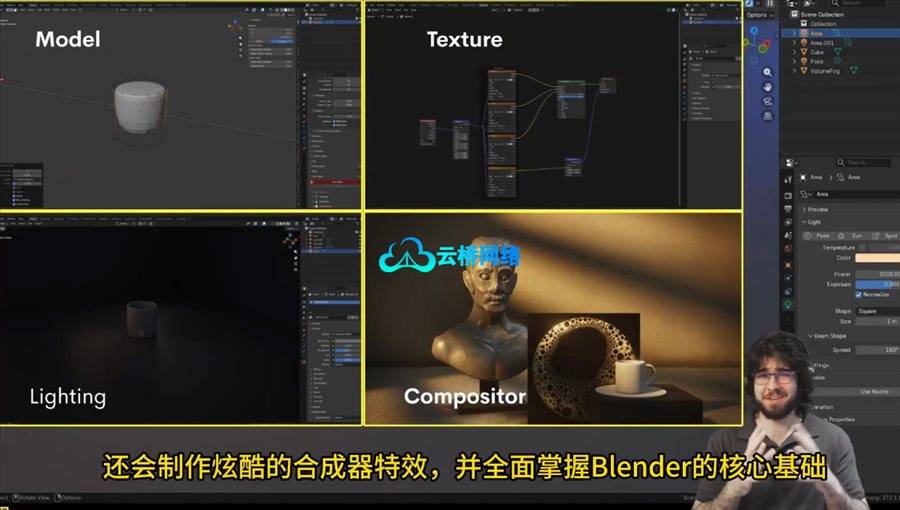
《Blender 5.0 入门教程:从零到你的第一张渲染》是一门由拥有8年以上经验讲师设计的趣味项目制课程,旨在帮助零基础学习者从入门到完成第一张精美的渲染作品。课程将系统教授Blender界面导航、3D空间操作及核心快捷键使用,并通过逐步实践让学员掌握建模、布光、材质与渲染全流程。学员将亲手制作风格化咖啡杯、舒适桌面布景以及最终的小雕像渲染场景,所有项目均优化适配低配置电脑。课程涵盖从基础场景搭建、细分曲面建模到有机雕刻的实践环节,并融入Blender 5.0最新界面优化与性能提升特性,最终通过整合项目完成可用于作品集的渲染成果,附带适合社交媒体的趣味动画彩蛋。本课程适合所有对3D创作感兴趣的新手、希望构建作品集的学生以及渴望系统掌握现代Blender工具的自学者。
课程时长:4小时32分钟 1920X1080 mp4 语言:中文朗读+中文字幕 含英语原声版本 含课程文件
Blender 5.0 for Beginners: From Zero to Your First Render。
What you’ll learn
Learn to confidently navigate Blender’s interface, move around the 3D space, and understand essential hotkeys.
Model, light, texture, and render simple yet cinematic 3D scenes that look great even on low-end PCs.
Create a stylized 3D coffee mug, a cozy tabletop scene, and a final mini statue render step-by-step.
Understand the basics of materials, lighting, and composition to make any render look professional.
Learn practical Blender workflows that build real skills for animation, game assets, or concept art.
Step into the world of 3D with Blender 5.0 for Beginners – a fun, project-based course designed to take you from zero to your first beautiful render from an experienced teacher with over 8 Years of Blender experience.
Whether you’ve never opened Blender before or you’ve felt overwhelmed by its interface, this course makes learning simple and enjoyable.
You’ll start by setting up Blender 5.0/4.5 and learning how to navigate the workspace. Then you’ll jump into hands-on projects:
A floating cube scene to learn navigation, lighting, and rendering.
A stylized coffee mug to explore modeling tools and subdivision modifiers.
A sculpting project to practice organic modeling.
A mini combined render to pull everything together into a portfolio-worthy project.
A cute product bonus animation for those Instagram posts you always see.
Along the way you’ll discover the latest updates in Blender 5.0 – including a refined UI, drag-and-drop tools, and performance improvements that make creating 3D art smoother than ever.
All projects are optimized to run beautifully even on low-spec computers, so you can create amazing results without expensive hardware.
By the end of this course, you’ll have developed the skills to feel confident building and rendering your own 3D scenes – ready to share your work with the world.
Who this course is for:
Anyone who wants to start 3D modeling but feels overwhelmed by Blender’s interface.
Beginner artists, designers, gamers, or creatives who want to bring their ideas to life in 3D.
Students looking to build a small Blender portfolio or create beautiful renders without a powerful computer.
Self-taught learners who want a structured, easy-to-follow introduction to modern Blender tools.
College/University students looking to get ahead in class and really shine!
课程目录:
1- 简介
2- 设置部分(安装与配置Blender)
3- 设置部分(安装Blender 5.0 / 5.1 Beta版)
4- 为初学者配置Blender
5- 插件:让Blender更强大
6- 简介
7- 导航Blender 5.0:初探界面
8- 导航Blender 5.0:进一步探索
9- 变换的强大功能:移动、旋转与缩放
10- 设置Eevee渲染器
11- 初学者电影级布光
12- 摄像机设置与构图
13- 渲染你的第一张图像
14- 迷你挑战:自定义你的场景
16- 欢迎来到建模篇:了解编辑模式
17- 创建杯子主体
18- 添加把手:简单又令人满意
19- 平滑与使用修改器
20- 材质与着色
21- 灯光部分1:主光
22- 灯光部分2:HDRI环境光
23- 渲染杯子
24- 附赠:快速杯子动画
25- 从建模到雕刻:理解两者的区别
26- 笔刷概览与基础重拓扑
27- 大型塑造部分1:外形
28- 大型塑造部分2:进一步塑造与定型
29- 雕刻部分1:精修与添加细节
30- 雕刻部分2:添加更多细节
31- 雕刻部分3:胸部和头发
32- 雕刻部分4:雕刻耳朵与调整
33- 重拓扑与清理
34- 纹理化与表面材质
35- 影棚灯光与渲染
36- 最后润色:旋转动画
37- 简介
38- 你需要首先了解什么
39- 场景布局基础:构建你的第一个迷你环境
40- 电影感镜头的构图与摄像机摆放
41- 创建我们的盘子和杯子:非破坏性建模
42- 高级灯光设置(影棚+氛围光)
43- 材质处理部分1:让一切协调统一
44- 材质处理部分2:继续
45- 最终与艺术性润色
46- 总结与渲染
47- 合成简介
48- 核心节点设置
49- 最终润色与导出
50- 附赠:杯子产品渲染
51- 最后:感谢
1、VIP会员仅需30元全站资源免费下载!
2、资源默认为百度网盘链接,请用浏览器打开输入提取码不要有多余空格,如无法获取 请联系微信 yunqiaonet 补发。
3、分卷压缩包资源 需全部下载后解压第一个压缩包即可,下载过程不要强制中断 建议用winrar解压或360解压缩软件解压!
4、云桥网络平台所发布资源仅供用户自学自用,用户需以学习为目的,按需下载,严禁批量采集搬运共享资源等行为,望知悉!!!
5、云桥网络-CG数字艺术学习与资源分享平台,感谢您的赞赏与支持!平台所收取打赏费用仅作为平台服务器租赁及人员维护资金 费用不为素材本身费用,平台资源仅供用户学习观摩使用 请下载24小时内自行删除 如需商用请支持原版作者!请知悉并遵守!
6、For users outside China, If you do not have a Baidu Netdisk VIP account, please contact WeChat: yunqiaonet for assistance with logging into Baidu Netdisk to download resources..

评论(0)